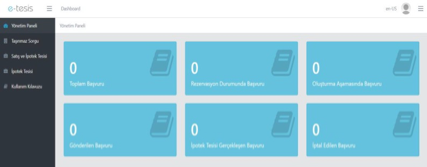
Administration Panel
A dashboard where users can view the status of all mortgage establishment applications in real time. Total applications, reserved, in creation, submitted, completed, and canceled applications are summarized in this panel.



An integrated solution that digitizes real estate sales and mortgage establishment end to end.

Enables selecting the correct property on a geographic map and prevents the risk of incorrect processing.

Compatible with TAKPAS, XML, WFS/WMS, and SQL formats.
Mortgage establishment applications and transactions can be reported through the system, and e-signed documents are generated automatically.

Works fully integrated with TAKBIS, MERNIS, EBYS, ERP, and e-signature services.

Complies with the General Directorate of Land Registry and Cadastre protocols and the Turkish Civil Code No. 4721.
E-Tesis is a web and geospatial software solution that enables public institutions, banks, and credit organizations to perform mortgage establishment and real estate sale + mortgage transactions online through TAKBIS via web services published by the General Directorate of Land Registry and Cadastre (TKGM).
It facilitates the digital transformation of real estate sales and mortgage establishment processes, enabling transactions to be completed remotely, without the need for physical visits to land registry offices.
Its web-based architecture and integrated infrastructure are designed to reduce processing times, alleviate staff workload, and minimize operational costs.
It ensures transaction security and document integrity with e-signature and automatic data validation features.

A dashboard where users can view the status of all mortgage establishment applications in real time. Total applications, reserved, in creation, submitted, completed, and canceled applications are summarized in this panel.
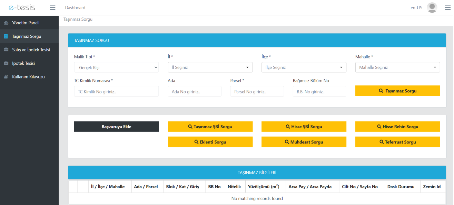
This is where users query property information to be used in mortgage establishment. By entering details such as owner type, province, district, neighborhood, block, and parcel, a query is performed via TAKBIS integration. Title deed, share, pledge, annex, and detail information is accessed to select the correct record and add it to the application process.
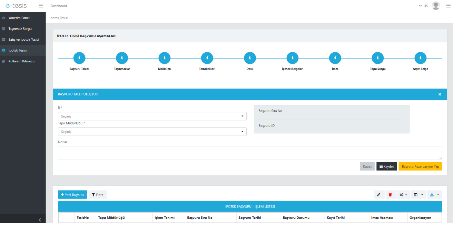
This is the screen where users create new mortgage establishment requests. By selecting the province and land registry office details, an application request is created, notes are added, and the process is started. Application status, signature stage, and record details are tracked through the list below.

This is the application screen where real estate sale and mortgage transactions are carried out together. The user selects the province and land registry office information and creates an application for the sale and mortgage process. Seller, buyer, representative, sale, DASK, document, and signature stages are followed sequentially in the system to complete the process.